/check-mail slash command
Create a command from your workflow
Setup
Make sure to connect Google Calendar and/or Mail. These are connectorsConnectorSmall bridges that let Claude reach into your other apps — Gmail, Calendar, Drive, Slack, Linear, Notion — with your explicit permission. — small bridges that let Claude Code read your calendar or inbox on your behalf. Open Claude Code settings → Connectors → sign in to Google, and grant the scopes you're comfortable with. You can revoke access at any time.
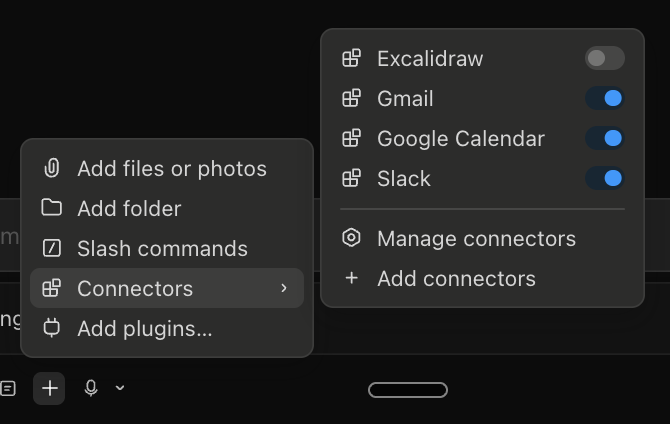
Prompt:
Check the last 24h of my mail
Next:
- Make this flow your own
- Fine-tune how you want the results returned
- Define what is important to you
- Define what is not important
Optional:
- Discuss with Claude what he thinks is best for you
When you are happy with the final summary of your last 24h of mail we can apply Claude Code magic:
Turn the workflow above into one claude command: /check-mail
Save this at ~/.claude/commands/
It needs to instruct to execute the mail checking in one go like I described above
Stuck?Debrief — what should have happened
A working /check-mail slash commandSlash commandA shortcut you type as /something to launch a workflow Claude already knows. Type /check-mail and Claude does the whole routine without re-prompting. file at ~/.claude/commands/check-mail.md, which when invoked summarises the last 24 hours of your inbox according to your rules. The file is just markdown. Read it. Edit it. Tomorrow you can refine the rules without touching code.
Stuck?FAQ for this exercise
Q: What connectors are needed for the exercise? Obviously Google and Slack — anything else? A: One is enough — Gmail is a good default since you use it daily. Calendar works for HR. The exercise is more about the flow than the specific connector.
Q: Do you suggest we connect our email and calendar with all the permissions that come up — including "permanently delete all your calendar"? A: Gmail is the safest because it only reads — it can't send. We use it to summarise mails, so connect with read-only permission. Avoid granting write/send/delete unless you really need it.
Q: It says I need to install a mail MCP server first — others have this issue too? A: Quit Claude Code completely and restart it (hard reset, not just close the window). After restart, with read-only permission, it should work.
Q: The slash command never appeared. How do I get /check-mail to work? A: Two things to check:
- Restart Claude Code fully (not just close the window). Commands only refresh when Claude restarts.
- For project-scoped commands, you must be inside the project folder. For globally-available commands, place the file in
~/.claude/commands/.
Q: How do I make a slash command available everywhere, not just inside the folder? A: Place the command file in ~/.claude/commands (global). For repoRepoA folder that git is tracking — looks normal, but inside is a hidden .git/ directory holding the entire history: every file, every change, every commit, every branch.-tailored commands, keep them in the repo's .claude/commands/ folder instead.
OptionalGo deeper
Compose a second command — /morning-brief — out of the pieces you already have. Start a new Claude Code session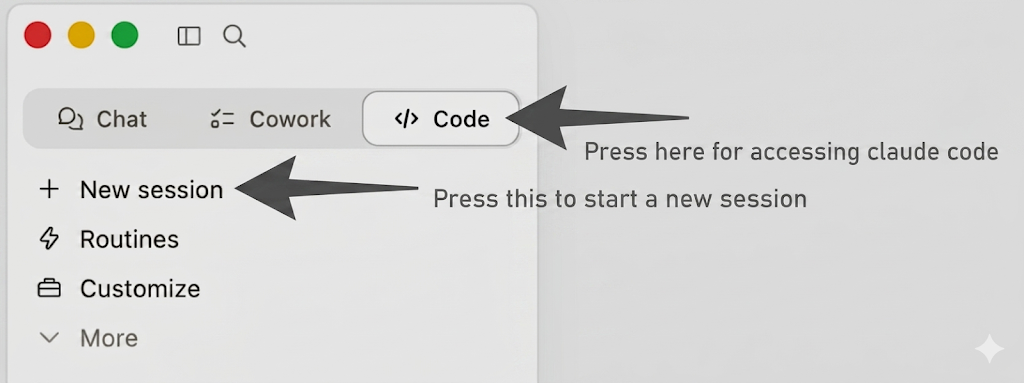 :
:
Build me a /morning-brief command at ~/.claude/commands/morning-brief.md.
It should:
- run the same logic as /check-mail (last 24h, my rules)
- add today's calendar (next 8 hours, just title + time + who)
- add open PRs assigned to me (use the gh CLI)
- output one combined screen I can read in 60 seconds
Restart Claude Code, type /morning-brief. You just composed three workflows into one keystroke — without writing a line of code outside the .md file. Reuse, don't rewrite.